


Introduction
Object-Oriented Programming (OOP) is the backbone of modern software development, but for many beginners and even experienced developers, the distinction between a Class and an Object can remain abstract. Think of it this way: if you are building a house, the architectural blueprints represent the Class, while the actual houses built from those blueprints are the Objects.
This guide breaks down this fundamental concept using a relatable example: a Smart Home system. We will explore how to define the structure of a device using UML Class Diagrams and how to visualize specific instances of that device using Object Diagrams. To illustrate these concepts, we will use Visual Paradigm, a powerful tool for modeling and design.
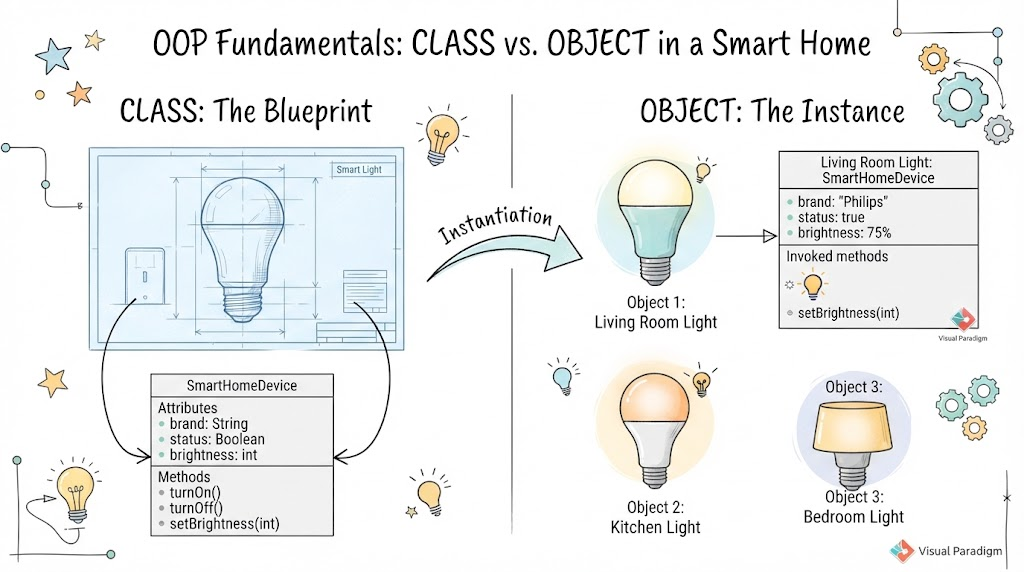
Key Concepts: The Blueprint vs. The Instance
1. The Class Diagram (The Blueprint)
A Class is a template or blueprint. It defines the attributes (data) and methods (behaviors) that every object created from it will possess. It does not hold real data; rather, it defines what kind of data can be held.
In our Smart Home scenario, we have a SmartLight class. Every smart light in the house, regardless of its current state, follows this definition.
Visualizing the Class with Visual Paradigm
Below is the Class Diagram for our SmartLight. Notice how it defines the structure without specifying the current brightness or color of any specific light.
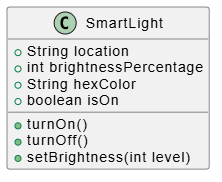
PlantUML Code:
@startuml
class SmartLight {
    + String location
    + int brightnessPercentage
    + String hexColor
    + boolean isOn
    + turnOn()
    + turnOff()
    + setBrightness(int level)
}
@enduml
Key Elements:
-
Attributes:
location,brightnessPercentage,hexColor, andisOndefine the state of the light. -
Methods:
turnOn(),turnOff(), andsetBrightness()define what the light can do.
2. The Object Diagram (The Real Instances)
An Object is a specific instance of a class. While the class is the general idea, the object is the “real thing” existing in memory at a specific point in time. Each object has its own unique values for the attributes defined in the class.
In our home, we might have a bright light in the living room and a dim, warm light by the bedside. These are two different objects created from the same SmartLight class.
Visualizing Objects with Visual Paradigm
The Object Diagram below shows two specific lights: livingRoomLight and bedsideLight. Notice how they share the same structure but have different real-time values.
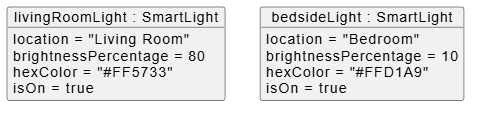
PlantUML Code:
@startuml
object "livingRoomLight : SmartLight" as lr {
    location = "Living Room"
    brightnessPercentage = 80
    hexColor = "#FF5733"
    isOn = true
}

object "bedsideLight : SmartLight" as bed {
    location = "Bedroom"
    brightnessPercentage = 10
    hexColor = "#FFD1A9"
    isOn = true
}
@enduml
Key Differences:
-
Instance Names:
livingRoomLightandbedsideLightidentify specific devices. -
State Values: The living room is at 80% brightness with a red-orange hue, while the bedroom is at 10% brightness with a soft peach tone.
Class vs Object Diagram Example
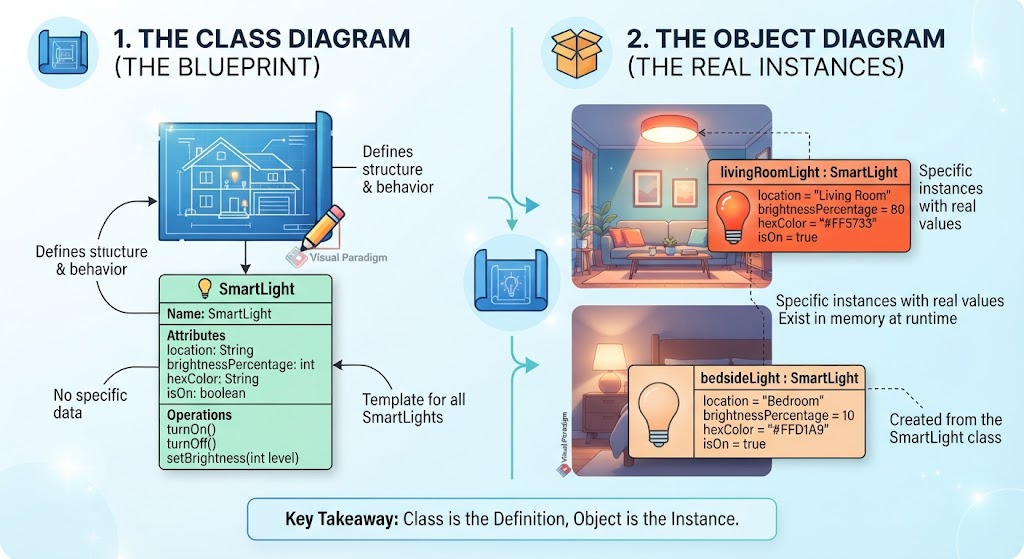
This Figure below visually contrasts the abstract concept of a Class with real-world Object instances using a Smart Home scenario.
-
The Class Diagram (The Blueprint): On the left, the blueprint phase showcases the
SmartLightclass definition. It outlines attributes likelocation,brightnessPercentage,hexColor, andisOn, alongside operations liketurnOn(),turnOff(), andsetBrightness()without assigning any concrete data or real-time values. -
The Object Diagram (The Real Instances): On the right, the infographic demonstrates concrete instances derived from that blueprint. It features two distinct objects—
livingRoomLightset to an 80% bright orange hue andbedsideLightset to a dim 10% soft peach tone—existing simultaneously in memory with unique state values.
-
Key Takeaway: Summarized at the bottom, the core message emphasizes that the Class serves as the foundational definition, while the Object represents the active, real-world instance.
Why Use Visual Paradigm?
Visual Paradigm (VP) offers a seamless environment for creating both Class and Object diagrams. Its integration with PlantUML allows developers to write code-like syntax to generate professional-grade diagrams instantly. This is particularly useful for:
-
Documentation: Keeping technical specs up-to-date with code.
-
Communication: Helping non-technical stakeholders understand system architecture through visual examples.
-
Debugging: Visualizing object states during complex logic flows.
Conclusion
Understanding the difference between a Class and an Object is the first step toward mastering Object-Oriented Design. By using tools like Visual Paradigm, you can easily transition from abstract blueprints (Classes) to concrete implementations (Objects). Whether you are designing a simple smart home app or a complex enterprise system, clearly defining your classes and visualizing your objects will lead to more robust, maintainable, and understandable code.
Remember: The Class tells you what a thing is, and the Object tells you what a thing does right now.
Reference List: Visual Paradigm Class and Object Diagrams
-
Class Diagrams vs. Object Diagrams in UML: An in-depth guide explaining the fundamental differences in purpose, elements, and usage between class diagrams and object diagrams .
-
Class and Object Diagrams: Explains how class diagrams model system vocabulary while object diagrams capture runtime snapshots, with practical real-world examples .
-
Object Diagram in UML: Bridging the Gap Between Classes and Instances: A case study demonstrating how object diagrams link abstract class definitions to concrete runtime instances, using an online shopping system as an example .
-
How to Draw Object Diagram?: A step-by-step technical tutorial covering the creation of object diagrams in Visual Paradigm, including creating instance specifications, defining slots, and creating links .
-
Practical 3: Structural Implementation: A hands-on guide that walks through generating a class diagram from a description using Visual Paradigm’s AI, followed by manual refinement and drawing techniques .
-
Generate Complex Class Diagrams Using Visual Paradigm’s AI UML Generator: A tutorial focused on creating detailed class diagrams with advanced features like inheritance and associations by crafting strong prompts for the AI chatbot .
-
Beginners Guide to Class Diagrams: An introductory article covering the key components of a class diagram and a guide on how to create one using Visual Paradigm Online, complete with templates .
-
Unveiling UML: Navigating the Differences Between Object Diagrams and Class Diagrams: A comprehensive comparison analyzing the focus, detail level, and use cases for both object and class diagrams .
-
8.1 PlantUML Diagram Reporting: Explains how to translate visual UML models into structured PlantUML code for reporting and documentation purposes .
-
UML Documentation: Create Client-Facing Reports: Offers insights into generating professional documentation from UML models using Visual Paradigm’s Doc Composer to tailor reports for different stakeholders .